The newest download combines Delirium and YouFlix media in one app, with free AI sites, creation tools and built-in Reaction Studio. Download the entire ZIP and extract it before running DeliriumDesktop.exe.
Are Media and Free AI part of the paid tools?
They are available inside the app before activation. Full Delirium tools still require account access, and this website keeps its existing account download requirements. Other services have their own access rules.
Where are wallpapers and colors?
Wallpapers are in Media → More → Media settings. Section colors controls the section palettes or a shared color.
Do I need to choose free or paid for every message?
No. Simple chat automatically prefers suitable configured free connections. Paid fallback is a saved option in Routing tools and starts off. If no suitable free route is available, Delirium explains why; it does not silently enable paid fallback.
Why can Auto and connected apps recommend different providers?
Auto ranks your enabled API models. Connected apps also considers allowed installed clients. Those pools can produce different recommendations. Routing diagnostics record the chosen route and flag when execution differs from its own recommendation.
How do I send a message from the keyboard?
Press Enter to send. Use Shift + Enter to add a new line.
Does Reaction Studio support every OBS plugin?
No. Desktop 1.2 supports compatible Windows x64 recording engine-plugin ZIPs. Plugins that require OBS’s Qt frontend, menus or docks—including the OBS browser and WebSocket frontend plugins—need additional integration. Studio mode, replay buffer and virtual camera are not yet exposed.
Can I stream to several services?
Yes. Configure up to eight RTMP/RTMPS destinations and start them together or individually. Each service requires its own account and stream key, platform rules apply, and every destination needs additional upload capacity.
Are the new AI features free?
Your existing guest AI directory and saved free-first routing remain. Optional OpenAI API tools require your own key and saved usage opt-in and incur separate provider charges. Muse Code and Dots have their own account and access requirements.
Desktop layout & shortcuts
YOUR DESKTOP WORKSPACE
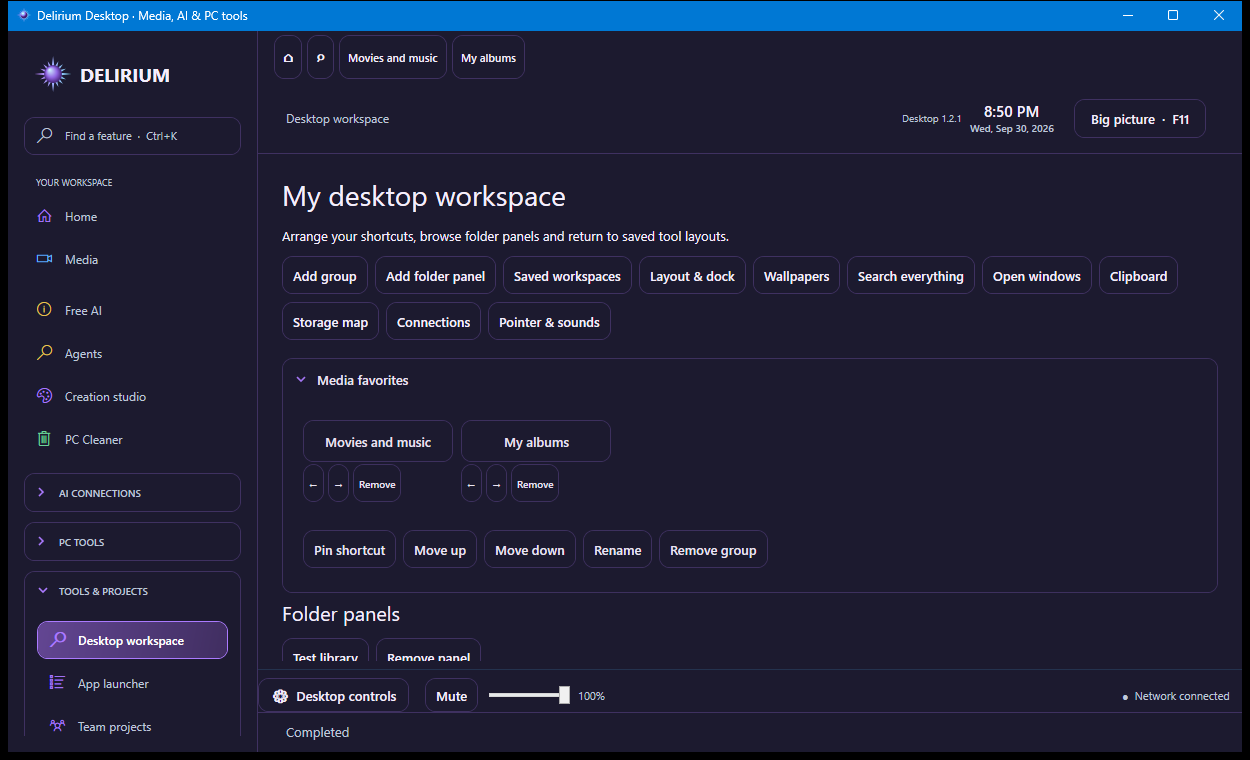
Arrange shortcuts into collapsible groups, pin chosen folders, and save your open tools and linked pop-out positions. A favorites and open-tool dock keeps them close. Press Ctrl+K to search sections, tools, media and file names in your chosen folders; Enter opens the selected result.
Make it yours
Choose compact or larger touch controls, tile sizes, labels, panel opacity, section colors and reduced motion. Export or import your workspace layout. Use image collections, muted video wallpapers or a different media wallpaper for each display.
Useful desktop controls
Switch between open Windows windows, review your session clipboard, inspect a chosen folder’s storage map, and see process-owned TCP connections. Clipboard image history is optional and stays in memory; storage scanning does not delete files. Optional cursor and shortcut sounds apply inside Delirium.
Desktop workspace in the combined app. Select the image to view the full screenshot.
Saved workspaces do not start recordings or streams. These desktop features work inside Delirium; Windows-wide skins, remote KVM and virtual display drivers are not included.
How much does team lifetime access cost?
Pay $31.99 per person once for 3–50 people: three seats cost $95.97. Each person has a separate account and up to three PCs. No recurring Delirium team fee. Team seats do not use the individual first-100 offer. Existing subscriptions retain their terms. AI provider usage is separate.
What is new in Desktop 1.3.2?
All 17 assistant enhancements: connection health, Auto escalation, routing explanations, saved conversations, task queue, project memory, file questions, research, voice, selected screen assistance, reusable draft skills, creation and streaming help, messaging drafts, media discovery, PC troubleshooting and optional animated identities. See capabilities and requirements.
 DELIRIUM