DELIRIUM — AI MORE THAN THOUGHT

Your next workspace
is on your PC.

One Windows app for your media, AI, creation and PC tools. Download the complete portable ZIP, extract all files, then launch DeliriumDesktop.exe.

Desktop 1.3.11Windows 10/11 x64Complete portable ZIP · about 919 MB

New here? Create an account and start a seven-day trial. No payment required and no automatic charge. AI provider usage is separate.

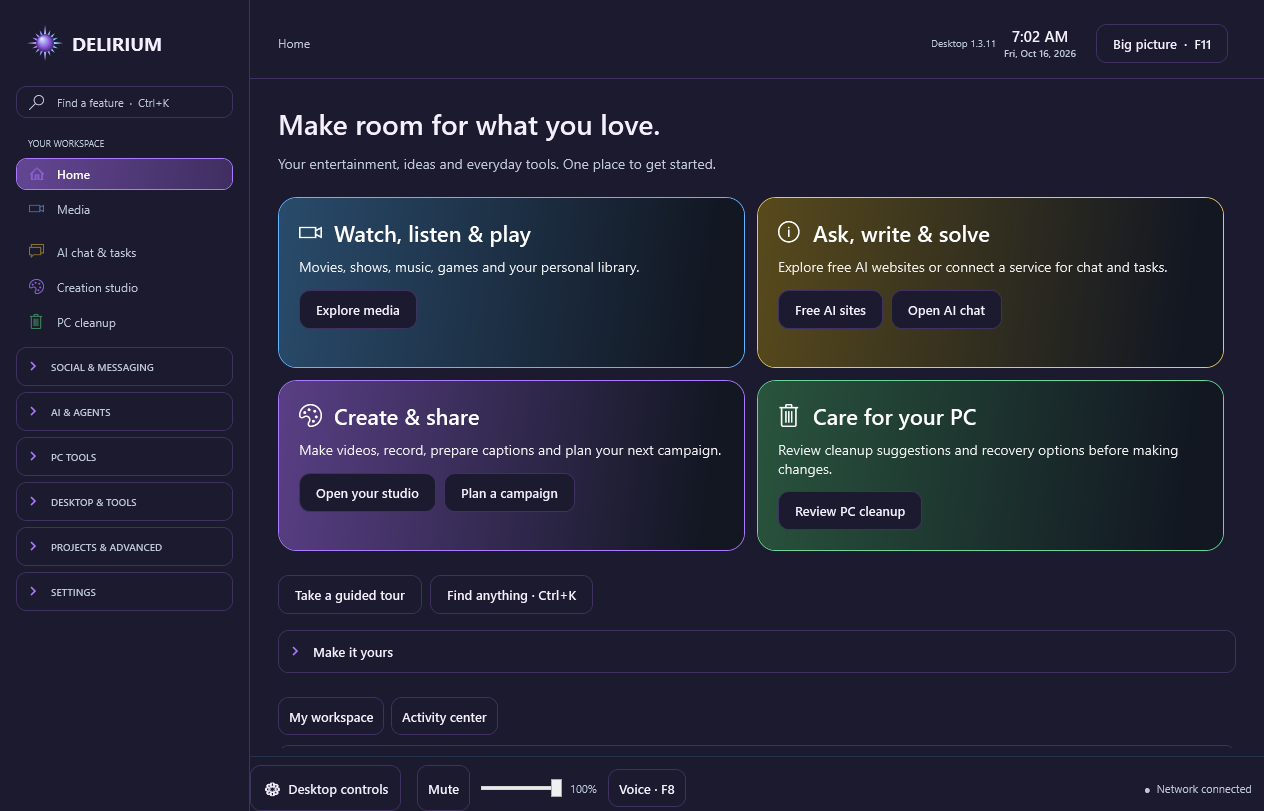
Delirium Desktop 1.3.11 home with Media, AI, PC cleanup and Create
The current Windows app · Desktop 1.3.11
Earlier release notes14 topics

Free-first for simple questions

Automatic routing prefers a suitable configured local model or a Gemini API project you have confirmed has billing disabled for simple questions. Suitability is estimated from the task and model settings.

If no suitable free route completes the request, Delirium explains why it could not send and keeps your draft. Paid fallback is a saved preference in Routing tools, so you do not have to choose free or paid for every message. Browser handoffs do not send your question or return the answer automatically. Provider free access and quotas may vary.

More demanding tasks keep normal model routing. Manually selected providers keep their chosen route. Subscriptions, promotional credits and unknown prices are not treated as free.

Delirium 0.29.1: live status and more provider choices

Status updates automatically when an observed connection, app, route, model or task changes. It shows the latest change time and distinguishes a requested model from one confirmed by the connected app.

Open their web chats from Delirium, or use your own API account to bring answers into Delirium chat. API keys, billing and model access are separate from app subscriptions. Qwen requires the official endpoint for your workspace.

Live status appears below the workspace and refreshes automatically. In a supported connected assistant, ask for Delirium status to read the same observed connection evidence without making a paid model call.

Team collaboration in 0.29.0

Bring teammates into a private room to chat, submit prompts and review project changes together.

Assign tasks or run them on your own PC using your configured AI connections. Everyone can see shared progress and results.

Each AI task uses its own working copy. The project owner reviews proposed changes; conflicting edits are held instead of silently overwritten.

Accepted revisions sync to connected teammates. Local edits remain private until published for review. This is file-version sync, not live keystroke editing.

The host PC must stay online. Connect over your LAN or an existing private network/VPN. Delirium does not provide a cloud host or automatic internet relay.

Included at the same Delirium plan prices. Each participant needs their own app access. AI usage and any network services you choose remain separate.

Explore team projects →

Faster route previews in 0.28.1

Route previews reuse local calculations. Every new preview and task still checks current settings. Includes all the features below, at the same plan prices.

Routing tools and multi-app launch in 0.28.0

Choose task preferences, fallback order and local-only routing. Compare available estimates before sending, then search and export recorded API and local-model usage.

Select several installed apps, or use Select installed to choose one option per detected app. Launch selected opens them together, keeps each displayed launch mode, and reports any app that could not start.

Export a project package, review the files, and save it on your PC or in a folder synced by your own cloud service. Share the package with a teammate through a service you already use.

Project packages are local file handoffs, not live collaboration or cloud task execution. Delirium does not host or automatically upload them; your chosen sharing service has its own limits and charges.

When you close the window, choose Hide in tray or Shut down. Select Don’t ask again to remember your choice, and change it later in Settings → Desktop preferences.

Included in your existing Delirium plan at the same price. AI provider subscriptions and usage remain separate.

Explore routing tools →

Connected apps in 0.27.0

Write one task, let Delirium choose an eligible connection, and receive the answer in Studio.

  • Auto: apps & models with Codex, Claude Code and Gemini CLI, plus optional API and local-model routes.
  • Automatic fallback after confirmed availability failures, with visible attempt history.
  • Explicit approval controls and no automatic replay after uncertain execution or partial work.
  • A redesigned PC information page with a hardware summary, component categories and local text-report export.
  • Automatic startup and full-shutdown handoff that restores Delirium-managed settings and preserves your own edits, plus manual disconnect and reconnect controls.

Installed clients need their own sign-in and access. Some open apps require a restart to reload connections. Ordinary chat windows are not controlled by this feature.

Explore connected apps →

New look in 0.26.1

Choose a dark purple or light lavender workspace, with rounded panels, violet and cyan accents, and clear icon navigation.

  • Dark and light appearance across Studio, settings, app tools and PC maintenance.
  • Choose your appearance in the app and on this website. Each remembers its own preference.
  • Rounded panels, spacious controls and violet-to-cyan highlights.
  • Icon navigation keeps your sections easy to recognize alongside their labels.

This release updates the app’s appearance. Your existing tools, model preferences, activation and membership continue to work as before.

See the refreshed workspace ↗

What’s new in 0.26.0

  • Completion sound: choose an audible ping when a supported AI response finishes.
  • System tray: choose to keep Delirium running when you close its window, then reopen or quit from the tray icon.
  • Language preferences: choose English, Spanish, French, German or Portuguese for navigation, settings and common controls. Some advanced help, reports and Windows messages remain in English.
  • App cleanup: review older temporary files, DirectX shader caches, and supported Chrome or Edge caches. Keep recovery copies first, then separately approve permanent backup removal to reclaim space.
  • Security tools: view Microsoft Defender status, use available scans, and open Windows Security for threat review.
  • PC information: inspect Windows, processor, graphics, memory and storage details in the app.

Microsoft Defender provides malware detection and follows your Windows protection settings. Cleanup actions require review. Your existing Delirium membership or remaining trial applies to this release.

Find the new features →

Earlier improvements in 0.25

Fixed a startup failure when choosing Launch with Delirium for Codex. The launcher now preserves your existing activation location, so an activated app can connect correctly. Connection failures also include a useful error message.

A new Start here screen guides you through setup. Clearer feature names, grouped navigation, and feature search make tools easier to find. The Delirium icon appears in the app and Windows, and AI chat includes a direct content-reporting option. File tools, presets, OCR, and reviewed cleanup remain together in the app.

Your account on this website handles the trial, downloads, activation and billing. Use the app for your daily tools.

Voice controls in your language.

EARLIER / DESKTOP 1.3.8

Choose English, Spanish, French, German or Portuguese. Voice controls share the app display-language setting.

Hold F8 to speak or explicitly start continuous listening. The microphone starts off. Changing language stops microphone input.

English, Spanish, French and German recognition need compatible installed Windows speech packs. Portuguese offline recognition is included.

The searchable guide shows translated commands and missing speech support. Portuguese continuous listening accepts assistente as its command prefix. Spoken answers need a matching installed Windows voice.

Translated commands retain confirmations, account requirements and AI spending limits. Local voice controls need no new paid service. Speech accuracy varies with microphone, noise and accent. Some advanced help and tutorial narration remain English.

Voice controls →

App-wide voice controls.

EARLIER / DESKTOP 1.3.7

  • F8 push-to-talk and optional continuous listening with a Delirium command prefix.
  • Searchable command guide, microphone indicators and adjustable recognition confidence.
  • Navigation, supported playback, volume, desktop controls, wallpapers, screensavers and themes.
  • AI draft dictation, connection selection, comparison, answer narration and task controls.
  • Tutorial navigation and configured recording/streaming controls, with confirmation where needed.

Local commands need installed English Windows speech recognition. Existing account, AI connection and spending requirements remain in effect.

Learn the voice commands →

Compare, combine and review.

EARLIER / DESKTOP 1.3.6

  • Parallel answers from two to four eligible AI routes, with individual results and shared task spending limits.
  • Optional checked combination retaining original responses, source links and disagreements.
  • Generated-file review, export and an isolated local HTML preview; an App builder assistant recipe.
  • Embedded Freebuff and Gvoid entries, supported Freebuff launch options and updated guided tutorials.
  • Updated browser and compatible Windows runtime components, with a shared newer installed browser runtime when available.

External AI services keep their own access requirements and charges. Multi-model agreement cannot guarantee accuracy.

Explore the new AI tools →

A clearer workspace. A quieter app.

EARLIER / DESKTOP 1.3.5

  • A welcoming home for entertainment, AI, creation and PC care.
  • Grouped campaign and creation controls, with better form labels and smaller-screen layouts.
  • Background campaign loading and receipt updates only when files change.
  • Shutdown waits for publishing and media exports to stop safely.
Explore everything included →

Chat and navigation improvements

EARLIER IMPROVEMENTS / DESKTOP 1.3.1

  • Enter to send, Shift + Enter for a new line, and Copy last answer.
  • Automatic free-first simple chat with one saved optional paid-fallback preference.
  • Bounded local routing diagnostics, connection and preference changes, backend model metadata and route mismatch warnings.
  • Media choices grouped beneath Media in the sidebar.

The complete portable ZIP includes the combined app, runtimes, source and license notices. Your existing Desktop profile is reused.

Desktop 1.2: the combined workspace

Desktop 1.2.0 introduced the Codex chat launch fix: sending from AI chat & tasks connects through the background interface instead of opening another Delirium window. The website screenshots now show this combined app throughout.

YouFlix and Delirium now work together in one app, with Media, Free AI, Creation studio and PC cleanup sections. Reaction Studio is embedded; it does not launch a separate OBS app.

  • A cleaner home page, grouped navigation and feature search.
  • Individual purple, blue, yellow and green section colors, shared-color mode and improved contrast.
  • Shared clock, calendar, volume, network status and desktop controls.
  • Reduced startup work, bounded artwork caching and quieter background polling.
  • Fixes for fullscreen, search hosting, studio layout and section switching, with wallpaper choices retained.

Download the complete ZIP, extract all files, then launch DeliriumDesktop.exe. This release uses manual complete-package updates. Existing Desktop settings carry forward; the older standalone Delirium profile is separate.

Read the Desktop 1.2 guide
Included app features10 topics

More ways to edit, create and play.

EARLIER / DESKTOP 1.3.9

Open Photopea and PhotoCraft inside Creation Studio for layered image editing. Use Piskel for pixel art, animated sprites and sprite sheets. These websites use Delirium’s shared browser runtime; save or export your projects in each tool. PhotoCraft is early alpha software.

Check supported media for Google’s SynthID watermarks from AI sites or Browser creative tools. Google sign-in is required. A missing watermark does not prove that content is human-made, and Delirium does not upload files automatically.

Find Android apps in Media → Your library → Apps & Games. Delirium detects an installed BlueStacks player and launches it on demand, or opens its official setup website. BlueStacks runs separately and requires its own installation; it is not included in the download.

Explore the new tools →

Desktop layout & shortcuts

YOUR DESKTOP WORKSPACE

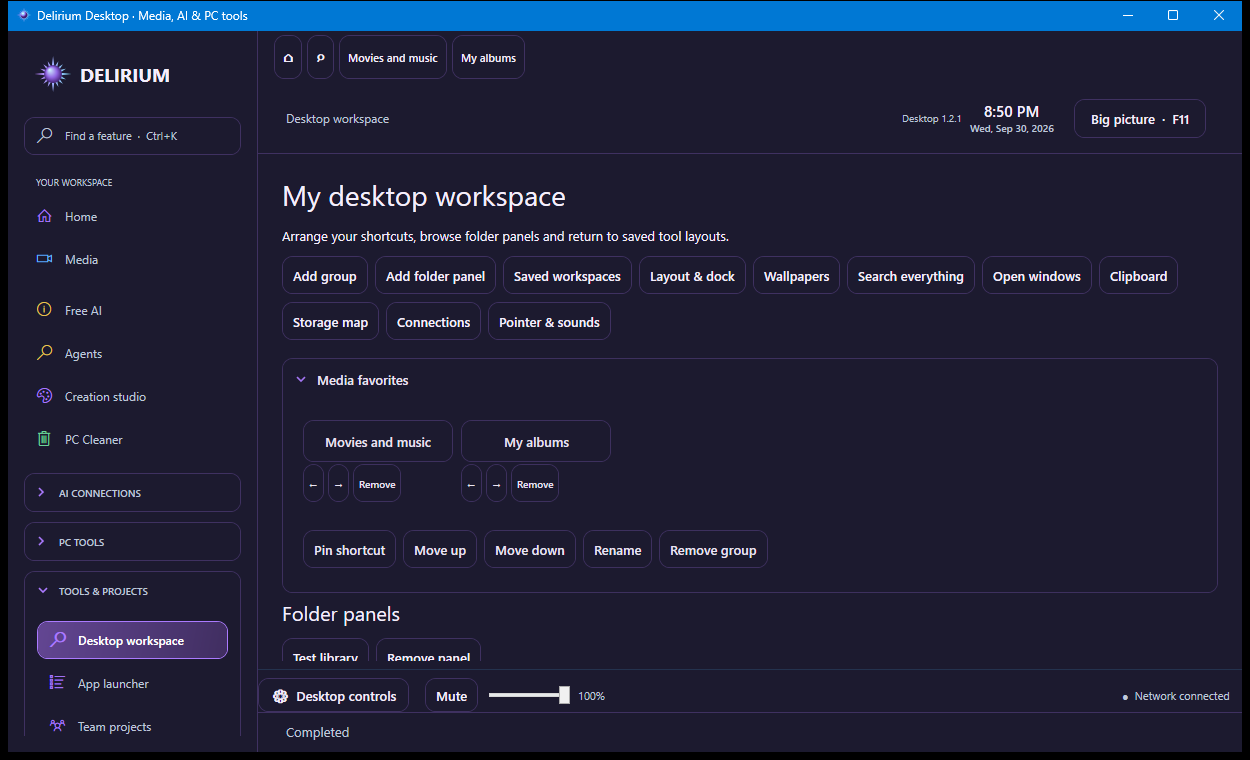
Arrange shortcuts into collapsible groups, pin chosen folders, and save your open tools and linked pop-out positions. A favorites and open-tool dock keeps them close. Press Ctrl+K to search sections, tools, media and file names in your chosen folders; Enter opens the selected result.

Make it yours

Choose compact or larger touch controls, tile sizes, labels, panel opacity, section colors and reduced motion. Export or import your workspace layout. Use image collections, muted video wallpapers or a different media wallpaper for each display.

Useful desktop controls

Switch between open Windows windows, review your session clipboard, inspect a chosen folder’s storage map, and see process-owned TCP connections. Clipboard image history is optional and stays in memory; storage scanning does not delete files. Optional cursor and shortcut sounds apply inside Delirium.

Delirium Desktop workspace with shortcut groups, folder panels and utility controls
Desktop workspace in the combined app. Select the image to view the full screenshot.

Saved workspaces do not start recordings or streams. These desktop features work inside Delirium; Windows-wide skins, remote KVM and virtual display drivers are not included.

New in Desktop 1.3.2

The assistant workspace adds saved chats, project memory, selected file and screenshot context, connection health, bounded task escalation and queueing, local voice, reusable skills and assistants across your existing tools. Messaging and Social media use a compact service picker.

The complete Windows ZIP includes the existing tools and WebView2. Keep its runtime folders together. Existing accounts, activation and pricing continue to apply.

All 17 enhancements and connection requirements

Tutorial companions

NEW IN DESKTOP 1.3.1

Animated pixel characters, guided tutorials and a cleaner desktop experience join the existing assistant, media and creation tools.

Pixel companions

Choose Orbit, Nova, Ember, Sage, Spark or Alex. Their animated pixel artwork includes idle, walking, pointing and talking states. Create a custom character or import portraits, GIFs and state animation packs.

An interactive guide

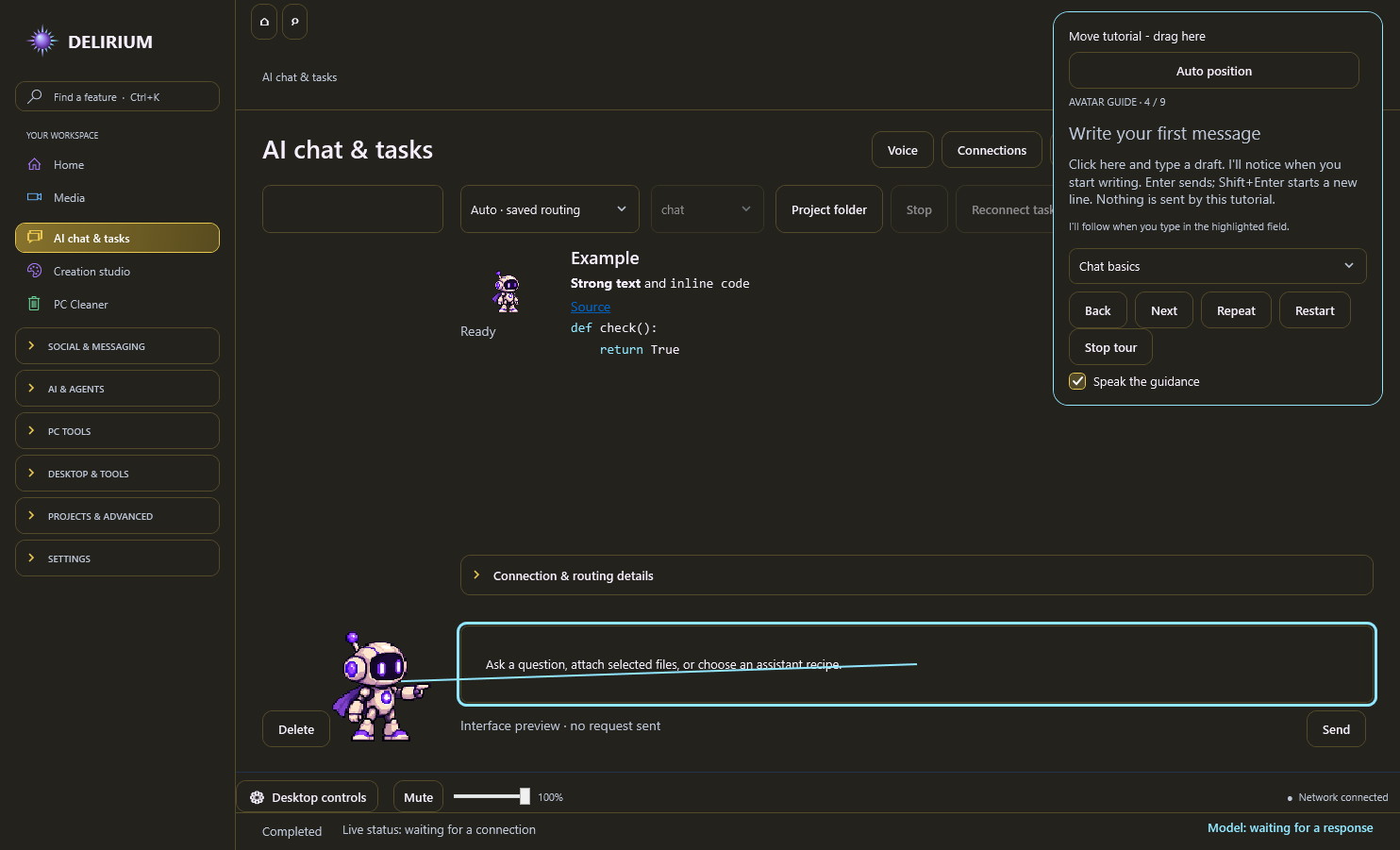
Full and focused tours highlight real controls and follow your clicks, selections and typing. Drag the tutorial card wherever you want, or restore Auto position. Friendly local speech uses the Windows voices available on your PC.

A clearer chat workspace

Your companion sits to the left of the conversation. Advanced tools and routing details collapse when you do not need them, with a saved-chat picker at smaller window sizes.

Uninterrupted fullscreen

Video fullscreen hides the app header, clock, desktop dock and tutorial. The interface returns when you leave fullscreen.

Wallpapers, screensaver and tray

Find wallpapers and screensaver settings in Desktop controls, Desktop workspace or Media → More. Choose a clock, wallpaper slideshow or black idle display. Hide to the system tray, restore the app or choose an exit behavior.

Responsiveness and readability

Idle AI polling backs off, artwork decoding uses a bounded cache, colors remain readable across themes, and inactive browser sessions can be suspended explicitly.

Safer project context and voice

Project memory requires a selected project folder. Releasing dictation preserves the final recognized phrase. Setup guidance explains account, connection and capability requirements.

Delirium 1.3.1 draggable tutorial beside a highlighted chat composer; no AI request was sent
Companion interface preview: the movable guide highlights the message field.

Provider accounts and activation requirements remain. Local narration quality depends on installed Windows voices. Imported artwork does not import a provider account or private agent data.

Publishing & campaigns

NEW IN DESKTOP 1.3.2

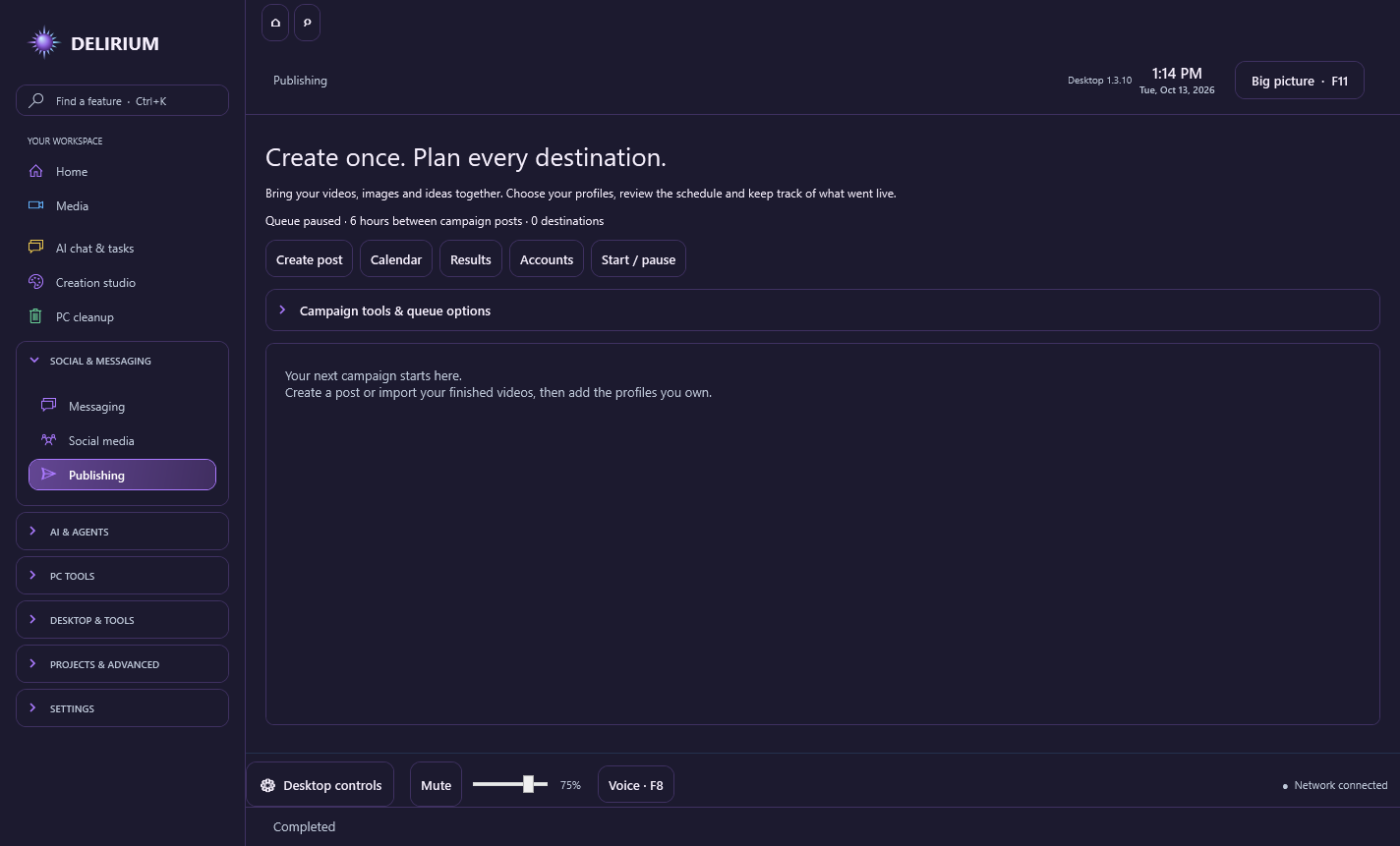
Build a campaign with videos, images and text in Delirium’s Publishing workspace. Prepare captions for each platform, choose multiple profiles, review a calendar and keep confirmed post links together.

Your campaign, organized

Create posts or import campaign packs. Set platform-specific captions, tags and formats, then choose the profiles that should receive each post.

A steady schedule

Six hours between campaign posts by default, with a configurable interval. Processing continues while Delirium is open or in the tray. Closing the app pauses it; missed posts do not publish in a burst.

Connected publishing

Direct connectors support YouTube video, Discord channel webhooks, and Mastodon video, images and text. Each needs the service’s account, permissions and connection setup. YouTube requires a registered desktop OAuth client; unreviewed API projects may keep uploads private.

Other social platforms

Use signed-in posting pages inside Delirium with prepared captions and media paths. These destinations require manual posting until an approved API integration is connected. A queue entry alone does not mean a post was published.

Know what went live

Review confirmed links, pending manual actions and uploads needing review. Export posting reports. Views, clicks and sales remain in the platforms’ or website’s analytics.

Protect your queue

Saved credentials are encrypted for your Windows account. Profile checks, duplicate protection and review after interrupted uploads reduce accidental repeat posts.

Delirium Desktop 1.3.10 Publishing workspace with campaign import, calendar, results and account controls
Earlier Publishing workspace · Desktop 1.3.10.

Delirium account and activation requirements remain. Platform policies, permissions and API availability apply. No paid advertising or third-party posting service is bundled.

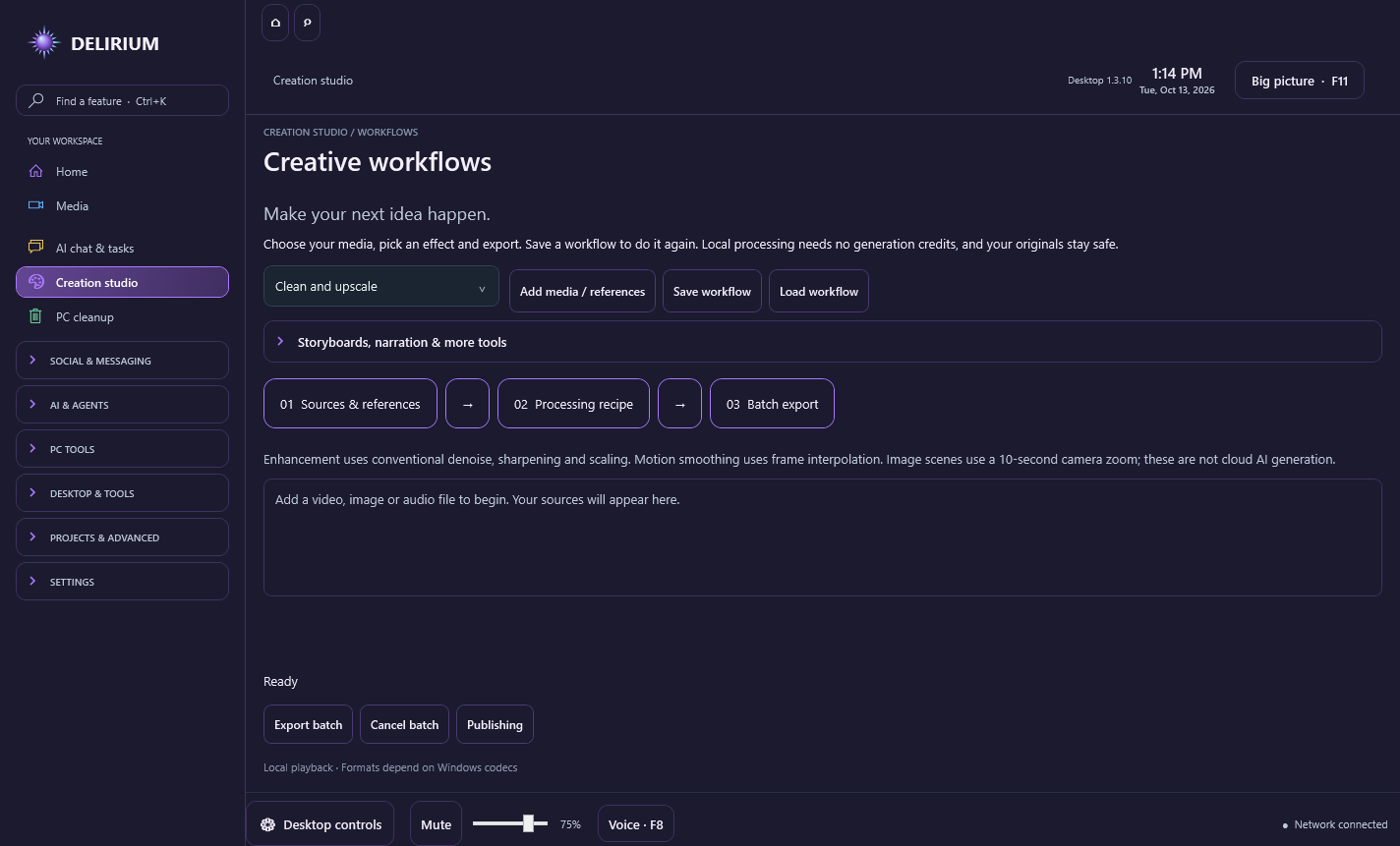
Creative workflows

NEW IN DESKTOP 1.3.3

Plan scenes, prepare narration and captions, and process batches using the media engine already included in Delirium. These local tools have no additional provider service fees.

Scenes and reusable projects

Save processing recipes and local media references as workflow files. Write reusable shot plans with camera angles, dialogue and transitions. Turn a still image into a ten-second zoom scene.

Voice and captions

Export narration with installed Windows voices. Write and export timed SubRip captions, attach a selectable subtitle track, or combine video with narration or music.

Prepare every format

Batch video cleanup, scaling, frame interpolation, vertical clips, horizontal formats, thumbnails, contact sheets and GIF previews. Extract audio, normalize loudness or reduce noise. Cancel a batch while preserving completed exports and originals.

Your colors, with atmosphere

Neon accent glow and responsive hover effects follow your chosen palette. Section colors, a shared custom accent, light and dark appearances stay available.

Delirium Desktop 1.3.10 creative workflow workspace with processing recipes, storyboard, narration, captions and batch export controls
Earlier creative workflows · Desktop 1.3.10.

These are conventional local media tools, not commercial cloud AI generators. Windows voice quality depends on installed voices. Motion smoothing processes up to five minutes; vertical clips up to sixty seconds; reverse clips use the first thirty seconds without audio. Automatic AI transcription and optional external generation retain their provider requirements and charges. Delirium account and activation requirements remain.

Microsoft Store release in review

Delirium — AI & PC Tools has been submitted to Microsoft for certification. It is not available in the Store yet. We’ll add the Store download here after approval; the website download remains available below your account sign-in.

Retained from 1.2.2

App-wide model and effort selection, cost-aware task capability checks, a clearer sidebar, persistent messaging and social tabs, and a connected inbox for supported API conversations. The complete build retains WebView2 and the existing creation tools.

Messaging features and limits · How Auto selects models

Local knowledge, workflows and retro setup

EARLIER / DESKTOP 1.3.10

Search explicitly selected project documents locally, then choose excerpts to include in an AI request. Delirium encrypts the stored text for your Windows account. Keyword search has no embedding-service fee; files are sent only when you include their context and submit.

Inspect context size and truncation, compare and restore custom recipe revisions, or save a research → draft → review workflow. Start each step explicitly and review its result. Your connected AI service retains its own account requirements and charges.

Connect separately running local MCP servers, inspect tool arguments and approve each call. This version supports loopback Streamable HTTP with manual calls; remote OAuth and stdio are not included.

Open a separately installed Odysseus workspace inside Delirium. Ajax links to its official availability page and is not bundled as an available model. Retro gaming brings together official frontend and emulator setup options; install those programs separately and use your own game files.

Explore the new tools →

Workspace, recovery and diagnostics

CURRENT / DESKTOP 1.3.11

Choose Home cards for Media, Creator or Productivity, and follow AI tasks, recording, exports, downloads and publishing from Activity center.

Save a selective suite backup of library settings, appearance, chats, approved memory and draft recipes. Preview restores and keep recovery copies. Backups are readable and may contain private information; original media, installed components and credentials are excluded.

Find document passages with optional local semantic search using an installed Ollama embedding model, or keep keyword search. Optional Windows OCR reads up to ten PDF pages using installed OCR languages. Review recognized text before including it in a request.

Compare saved AI trials and run an optional short local export benchmark. Reports show observed timing and estimated costs, with clear limits. They are not an overall intelligence or gaming score. Provider charges still apply to AI trials.

Supported publishing adapters verify destination identity before submission and distinguish upload progress from confirmed publication. Automatic adapters remain YouTube, Discord webhooks and Mastodon; other services keep their existing requirements.

Signed, version-matched component downloads support staging and rollback after restart. The complete download keeps its bundled creative tools and WebView2. Optional LocalSend, Zotero, ShareX and PowerToys connections launch separately installed apps and provide setup guides.

Use light, dark or high-contrast appearance, enlarge dialog text and navigate dialogs with a controller. Updated tutorials explain the new tools.

Explore the new tools →
Installation & requirements5 topics

Download. Activate. Make it yours.

  1. Sign in to your Delirium account and start the trial or choose a plan.
  2. Download the complete ZIP from your account and choose Extract all. Keep all included folders beside DeliriumDesktop.exe.
  3. Run DeliriumDesktop.exe from the extracted folder. Generate an activation code and paste it into Account for full Delirium features. Activate up to three PCs.
  4. Explore File & data tools right away, or configure your supported AI providers and local models.

Follow the complete setup guide ↗

What your PC needs

Windows 10 or 11, 64-bit. Allow at least 5 GB of free space for the download and extracted folder. Internet access is needed for sign-in, initial activation, membership verification and cloud AI. Local models require their own compatible hardware, downloaded model files and a configured Ollama or LM Studio server. Optional isolated checks require Docker Desktop.

Keep your app up to date

Combined Desktop builds use manual complete-package updates. Download and extract the latest full ZIP; do not replace just the executable or mix release folders. Older standalone builds keep their own update process. Membership checks remain separate.

Offline membership access lasts up to 30 days between checks, within your paid period or remaining trial. Cloud AI still needs an internet connection.

Download and publisher verification

The Windows executable is not yet signed with a Windows-trusted publisher certificate. Your browser or Windows may show an uncommon-download or unknown-publisher warning. Desktop 1.2 is a portable ZIP with SHA-256 verification details. Older standalone update signatures do not apply to this combined package.

Download through your account, where the release version, file size, and SHA-256 are available under verification details. Keep Windows security enabled. If your antivirus identifies a specific threat, stop and report its name rather than treating it as a reputation warning.

Need help with a download warning? Contact Delirium support and include the warning text.

How Windows publisher signing works

A complete app with shared components

All creation tools stay included. Delirium includes WebView2 for in-app browsing and shares compatible conversion components across its tools. The complete package needs no separate browser-runtime download.

The current complete Windows download is about 899 MB. Extract all files before launching the app; allow at least 5 GB of free disk space for the download and extracted folder. Compatible native tools retain the libraries they need.

Download Desktop 1.3.11 source ZIP →

Source is optional for using the app. Original license notices remain included; matching native source archives are provided once in the source bundle. Full Delirium features still require account activation.